
Overview
VerifyBiz Confirmation of Payee (CoP) is built on a distributed API-based architecture that enables secure, real-time message exchange to check, prior to payment, whether the recipient’s account name matches the account number held by their bank.
The service is interoperable across all major New Zealand retail banks, with each providing a response.
VerifyBiz is enabled via GetVerified’s own instance of the CoP request and response. This routes CoP requests via API to New Zealand retail banks, to return a response to you, our VerifyBiz customer.
This document acts as an integration guide and sits alongside our Vendor’s (obconnect) ‘connect-api-gv-nzba.json’ swagger file.
The purpose of this document is to describe the API components that a VerifyBiz CoP requester will need for its CoP Request service.
Actors
The following actors are involved in the CoP journey:
- Payer – a customer who intends to transfer funds from their account
- CoP Requester – a GetVerified customer, authorised to submit a CoP Request
- Obconnect Request Instance – the instance provided by obconnect to GetVerified to send the CoP Request to a CoP Responder on behalf of a CoP Requester
- Obconnect Respond Instance – the instance provided by obconnect to GetVerified to receive CoP Responses intended for a CoP Responder
- CoP Responder – a GetVerified customer authorised to submit a Response to a CoP Request
- Payee – a customer who is an intended or actual recipient of funds into an account at the CoP Responder
Architecture
Key Components Overview
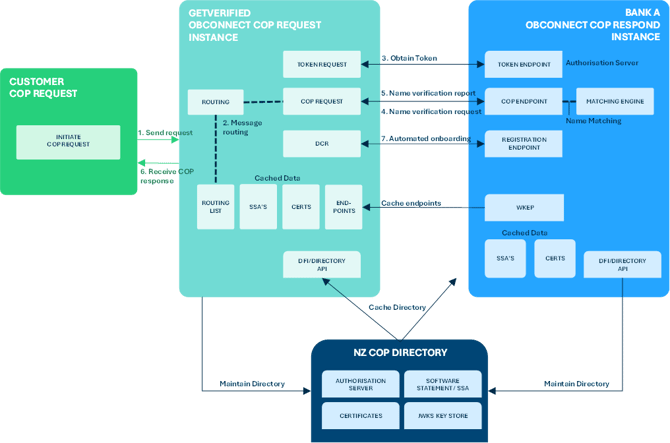
The following diagram gives an overview of the key components used for the CoP service. For context this document focuses on the specific requirements and components adopted by a GetVerified VerifyBiz customer, which is highlighted in green.
CoP uses OAuth2 security framework to verify the identity of requesters and responders - enabling a secure connection. A VerifyBiz customer uses GetVerified’s own instance of the CoP request and response. GetVerified has been enrolled into the NZ CoP Directory.
Descriptions
- Send Request: Used to initiate a CoP Request via GetVerified/obconnect. Please refer to endpoint ‘POST/nameverification’ in this document.
- Message Routing: obconnect determines which CoP Responder Bank to send the CoP message to. Please refer to ‘Message Routing’ for further background information.
- Obtain Token: obconnect will obtain a short-lived access token from the intended Responder Bank which is used to consume their name-verification endpoint.
- Name Verification Request: obconnect will send a CoP request to CoP responder bank using the payload provided by CoP Request client.
- Account Name Verification Report: CoP Responder Bank provides their cop response.
- Receive CoP Response: CoP Request Client receives cop outcome from GetVerified/obconnect CoP Request Instance.
- Automated onboarded (DCR): obconnect’s solution is responsible for the onboarding (DCR) to all CoP Responders and must be completed prior to any CoP requests being routed to that CoP Responder.
Swagger Specification – POST/name-verification
Please refer to ‘connect-api-gv-nzba.json’ swagger file.
Request Headers
|
Header Value |
Notes |
Mandatory / Optional |
|
apiKey |
The unique apiKey provide to client by obconnect |
Mandatory |
|
x-interaction-id string |
RFC4122 UUID used as a correlation id |
Optional |
|
Content-Type |
Standard HTTP Header – set to value: application/json |
Mandatory |
|
Accept |
Standard HTTP Header – if set must have the value: application/json |
Optional |
Request Parameters
|
Header Value |
Notes |
Mandatory / Optional |
|
SchemeName |
Used to indicate Bank Prefix, Branch, Account and Suffix are used as an identifier |
Mandatory |
|
AccountType |
Used to indicate whether the Payer is intending to pay a personal or business account |
Mandatory |
|
Identification |
The Bank Prefix, Branch, Account and Suffix of the Payee |
Mandatory |
|
Name |
The name of the Payee as input by the Payer |
Mandatory |
Request Parameter Descriptions
- SchemeName: always “BankBranchAccountNumberSuffix”
- AccountType: always “Personal” (future functionality might support Business or Personal)
- Identification: 2-digit Bank, 4-digit Branch, 7-digit Account & 3-digit Suffix There must be no spaces between them, and it must always be included. Pattern: ^[0-9]{16}$
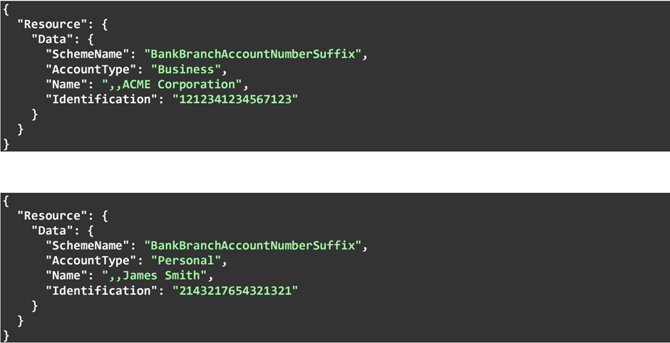
- Name: Name of Payee as input by Payer - max 140 text. CoP Requester client must send requests in unstructured formats, for all account types. Note: the 2 commas as shown in the payload examples below, must be used to ensure compliance with the unstructured format.
Example payloads
HTTP Response Codes
|
Code |
Code Description |
Description |
|
200 Payee Validation Response |
N/A |
Query completed successfully. |
|
400 Bad Request |
OBCONNECT.InvalidRequest |
Request has malformed, missing, or non-compliant JSON body or URL parameters. |
|
400 Bad Request |
OBCONNECT.InvalidParticipant |
The 2-digit Bank Prefix and/or 4-digit Branch belongs to a Bank that is not yet a COP Responder or is but has not yet been onboarded (DCR) to by obconnect. |
|
401 Unauthorised |
N/A |
Authorization header missing or invalid apiKey. |
|
429 Too Many Requests |
N/A |
Too many requests. |
|
500 Internal Server Error |
N/A |
Internal Server Error. |
|
502 Bad Gateway |
N/A |
Bad Gateway – there was an error with the CoP Responder. |
|
504 Gateway Timeout |
N/A |
The CoP Responder did not respond to a request within expected time. |
Response Parameters (200)
|
Header Value |
Notes |
Mandatory/Optional |
|
Matched |
Used to indicate if CoP Request resulted is a match (true) or a negative match (false). |
Mandatory |
|
ReasonCode |
Used to indicate the Matching Reason Code if the response was a negative match (false) |
Conditional: if ‘Matched’ = ‘false’ |
Response Parameter Descriptions
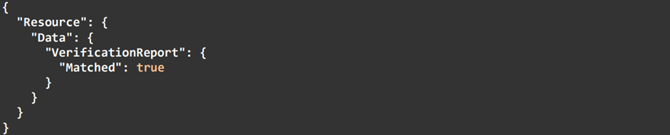
- Matched: either ‘true’ or ‘false’ and used to indicate if a CoP Request is a match or a negative match
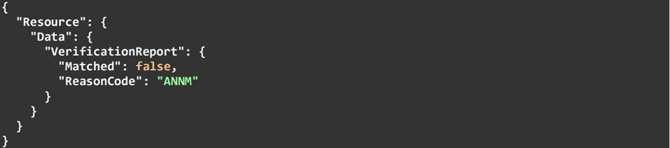
- ReasonCode: can be 1 of 9 potential reasons why the CoP Request was a negative match. Please see Reason Codes section for more information.
Example payloads
Where there was a match (true):
Where there was a negative match (false):
Reason codes
The following reason codes will be provided on the API response depending on the result of the matching performed by the CoP Responder.
|
Reason Code |
Code Description |
Matched |
Long Description |
|
N/A |
N/A |
True |
The CoP Responder has performed the matching and confirms it’s a match |
|
ANNM |
Account Name Does Not Match |
False |
The CoP Responder has performed the matching and confirms it’s not a match
|
|
MBAM |
There may be a match on the account name |
False |
The CoP Responder has performed the matching and it’s a close match |
|
BANM |
Business account, name matches |
False |
The CoP Requester indicated that the Payer intends to pay a personal account, but the actual account is a business account, and the name matches |
|
PANM |
Personal account, name matches |
False |
The CoP Requester indicated that the Payer intends to pay a business account, but the actual account is a personal account, and the name matches |
|
BAMM |
Business account, name may be a match |
False |
The CoP Requester indicated that the Payer intends to pay a personal account, but the actual account is a business account, and the name might be a match |
|
PAMM |
Personal account, name may be a match |
False |
The CoP Requester indicated that the Payer intends to pay a business account, but the actual account is a personal account, and the name might be a match |
|
AC01 |
Incorrect Account Number |
False |
Account does not exist in the CoP Responder’s books |
|
ACNS |
Account type not supported for CoP |
False |
Account not supported for CoP by the CoP Responder |
|
BSBF |
Branch state branch fault - not supported at endpoint |
False |
The CoP responder has incorrectly received a CoP request for a Branch code that does not belong to them |
Performance
Response Times – POST/name-verification
Confirmation of Payee must be able to run in near real-time 24/7 to maintain a good customer experience.
The following will apply to the API response time which is defined as the time from when the CoP Requester sends the API call to when they receive a response:
- Response time SLA is 1.5 seconds
- Obconnect Request Instance will timeout a request if it does not receive a response within 3.5 seconds.
- Upon timeout, it is OPTIONAL for the CoP Requester to retry the request. Attempting further requests is at the discretion of the CoP Requester. Note – a new interaction id must be used for any retry.
Connectivity & Security
obconnect’s Connect API is protected by the following:
- apiKey
Message Routing:
based only on the information provided by the Payer. Obconnect Request Instance must be able to route the message based on a CoP Responder that:
- Is a Payment Service Provider that owns its own ‘Bank Prefix’ (2-digit code), or
- Is a Payment Service Provider that does not own its own Bank Prefix but uses a specific (or a range of) ‘Branch’ (4-digit codes) belonging to another PSP. NZ Responder Banks will publish as part of their Auth Server credentials either their 2-digit Bank Prefix or (for Agency Banks) the 2-digit Bank Prefix + 4-digit Branch code. Note: the field where this data is stored and cached within the NZ CoP Directory is yet to be defined.
Example:
|
Bank Prefix |
Bank Name |
Branch Range |
|
02 |
BNZ |
0001-1299 |
|
02 |
The Co-operative Bank |
1242, 1245-1247 |
BNZ Bank will publish the following for Routing:
- ‘02’
Co-op will publish the following for Routing:
- ‘021242’
- ‘021245’
- ‘021246’
- ‘021247’
Routing therefore will first look for a 6-digit match (2-digit Bank + 4-digit branch), if it exists, it will route there, if it does not exist, it will route to bank that matches the 2-digit Bank prefix.
If a Payer enters the following “BankBranchAccountNumberSuffix” combination:
- 0200011234567123 – the request is routed to BNZ bank
If a Payer enters the following “BankBranchAccountNumberSuffix” combination:
- 0212421234567123 – the request is routed to Co-operative Bank